Tools we built for our own robot
A drivetrain optimizer, a belt calculator and a transfer builder. Free for every FIRST® Tech Challenge team, with nothing to install.
Speed or torque?
Every drive team weighs that trade. We built these tools to answer it for our own robot before anyone cuts a part, and any FTC team can use them.
- Nothing to install
- Each tool is a web page. It runs on a laptop in the pit or on a phone.
- Share a setup as a link
- Each tool can put a setup in a link, so a teammate opens exactly what you see.
- Picks up where you left off
- Your last setup comes back on the same device, with a Start fresh button beside it.
Drivetrain optimizer
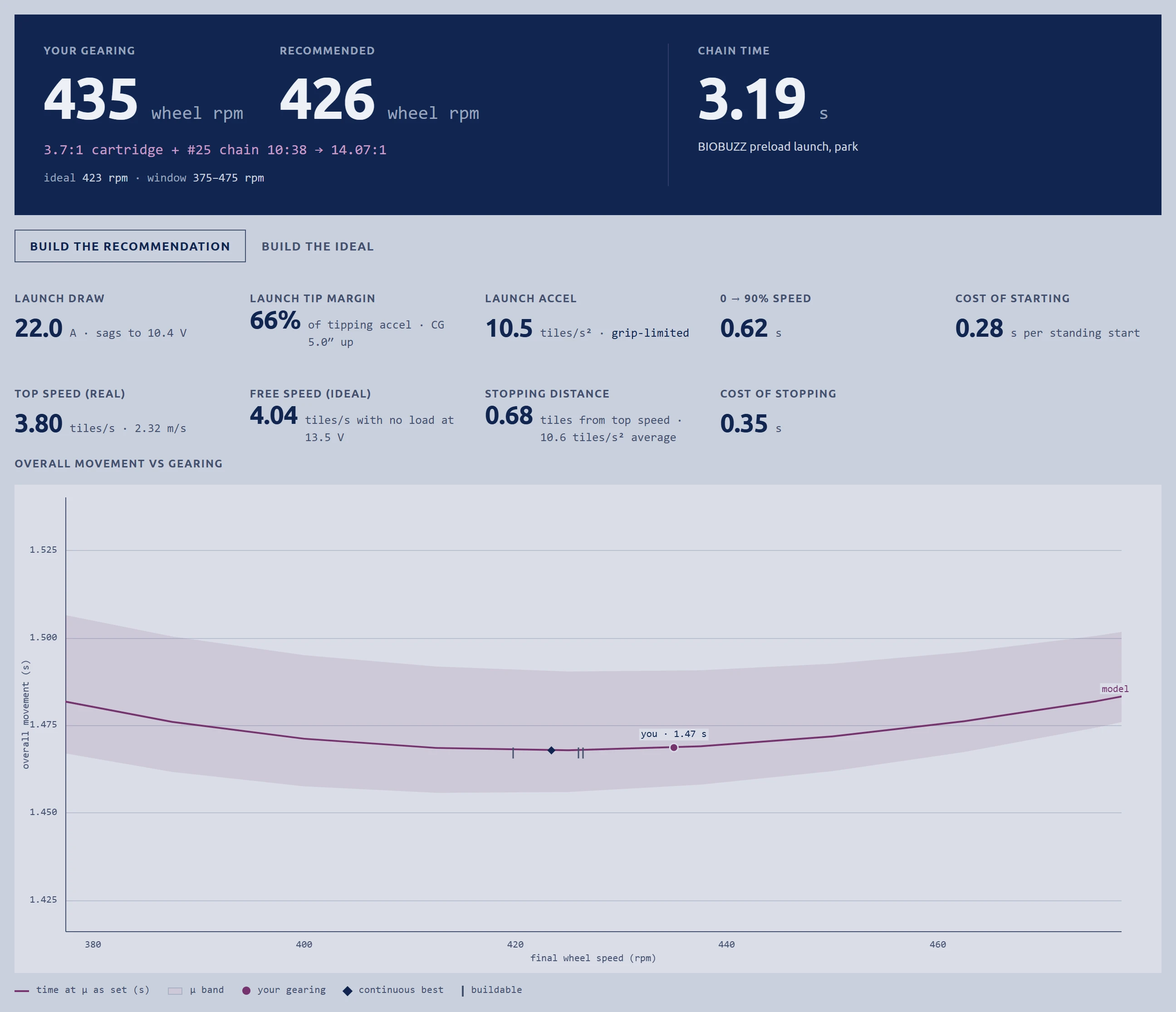
Finds the fastest gearing you can build over runs of one to six tiles, counting battery sag, the 20 A fuse, wheel slip and braking, then times your own Pedro Pathing autos on it.
Loading the drivetrain optimizer
What it does
- Recommends gearing you can build: a cartridge plus a tooth pair, never a motor speed nobody sells.
- Times your own Pedro Pathing auto on the gearing you set. Pin two setups and compare their times on that auto.
- Gives each answer as a window across the grip range, because the constants underneath are ranges.
- Treats the 20 A fuse as a heat budget that allows short bursts, with a hard cap beside it to compare.
- Charges every run for its stop, using the drivetrain's own motor-braking curve.
- Works out what your robot can push: held and burst force, the heaviest box it can slide, and 10 to 20 kg opponents.
- You give it
- Weight and balance, wheels and grip, battery and fuse, a goBILDA, REV or AndyMark motor on vendor specs or gm0 dyno data, and the gearing.
- You get
- Wheel rpm and a build to order, launch current and acceleration, top speed, stopping distance, time against gearing, and pushing force.
How it is checked
- The bare-motor math reproduces the 18.7 kg·cm output torque goBILDA publishes for its 435 rpm motor.
- Scripts ran against the page's own functions: the battery sag solve against a bisected root, the brake table against a fine integral, top speed against a 40-second run.
- Every constant carries a source and a confidence tag in our research notes: verified, inferred, measured on our robot, or searched for and not found.
Auto paths
The Simulate section of the drivetrain optimizer
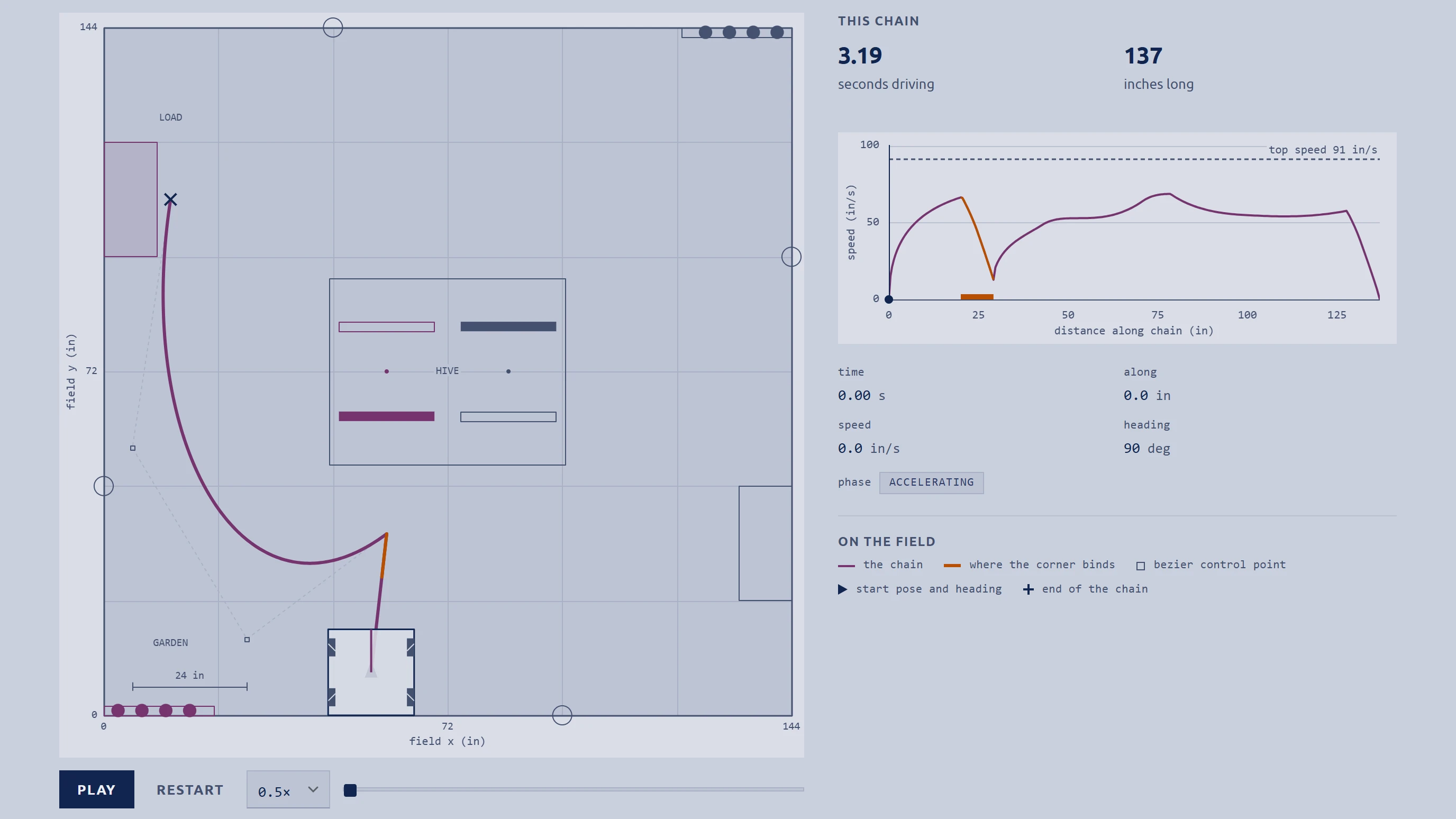
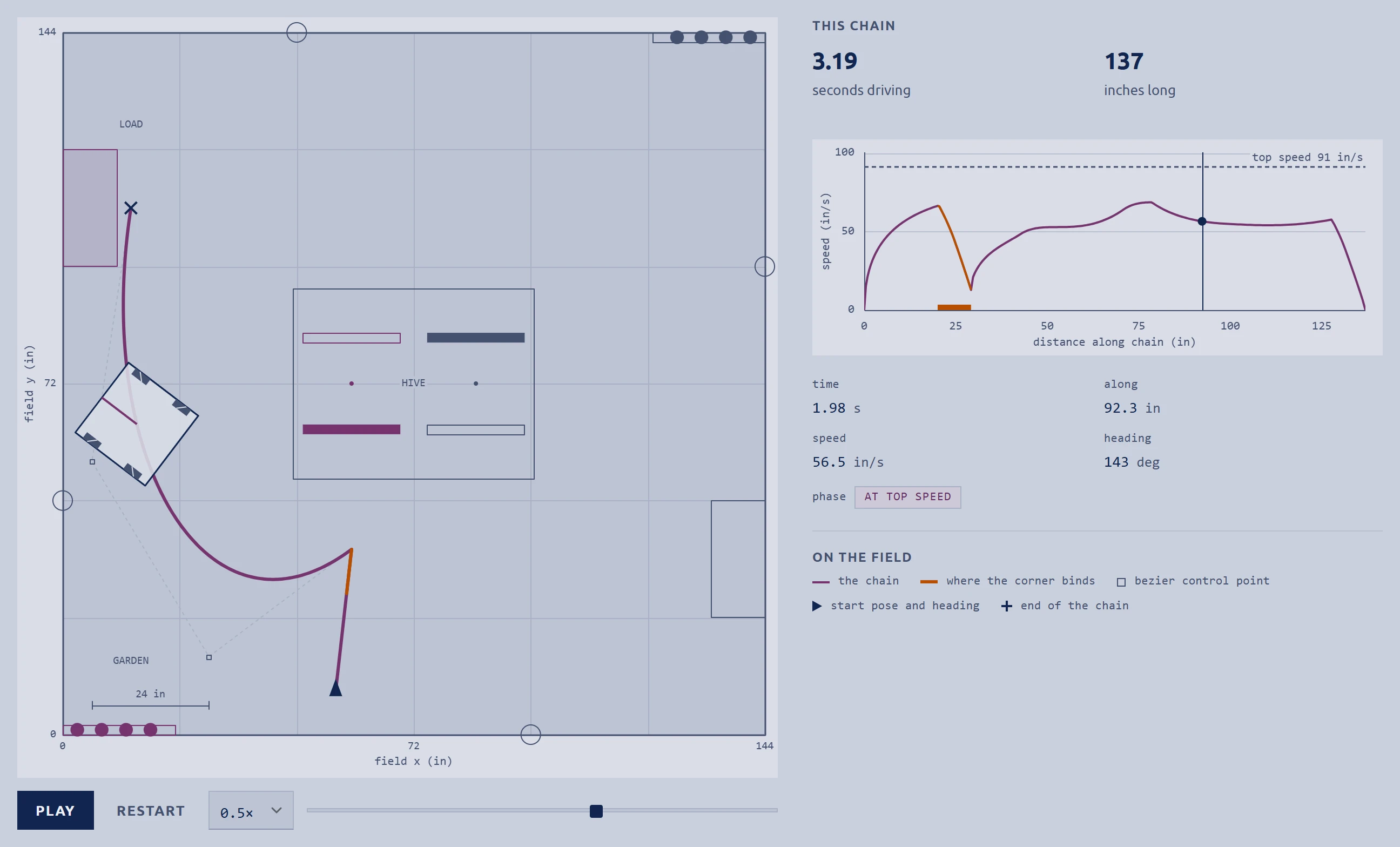
Paste your Pedro Pathing auto and the optimizer times it on your drivetrain across the field for BIOBUZZ™ presented by RTX, then scores what finishes inside the 30-second auto. Change the gearing and the time moves with it.
Loading the auto paths
What it does
- Reads Pedro Pathing 3.0.1, 2.1.2 builder code, 1.0.x paths and the visualizer's .pp files, and writes everything back out as 3.0.1.
- Times the path with the same drivetrain physics, and marks the stretches where a corner, not the motor, sets the speed.
- Plays the run to scale on the field, with a scrubber and a speed control.
- Scores LEAVE, PARK and HIVE tips, and gives nothing for a stop that ends after 30 seconds.
- of auto
- 30s
- points for LEAVE
- 3
- points for PARK
- 5
- points a HIVE tip
- 20
- You give it
- A path, picked from the presets or pasted as code, the alliance, launch and garden stop times, and POLLEN per tip.
- You get
- Drive time and length, speed along the path, time left in auto, and points.
How it is checked
- Field positions come from the Competition Manual, version TU07 (released September 12, 2026) and the official visualizer's field image, measured at 7.5 px per inch.
- Pedro Pathing was read from source at its v3.0.1 tag, and the editor's reader and writer were checked with parse and round-trip tests.
- The preload preset clears the HIVE frame by 5.53 inches at its closest, checked with the robot's turned footprint 400 times per segment.
16 and 48 tooth pulleys, 3 : 1. Size a belt for it
Belt calculator
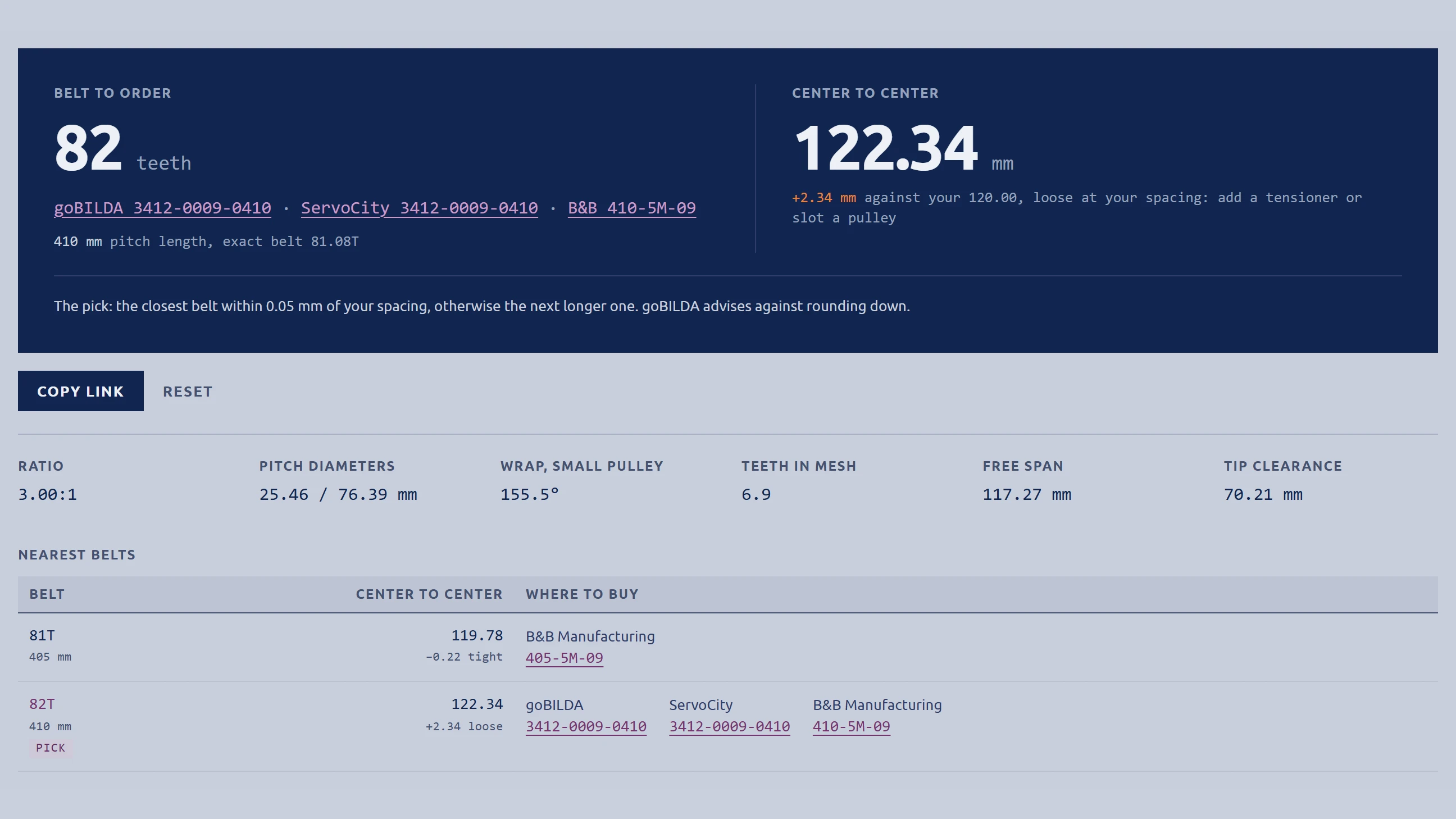
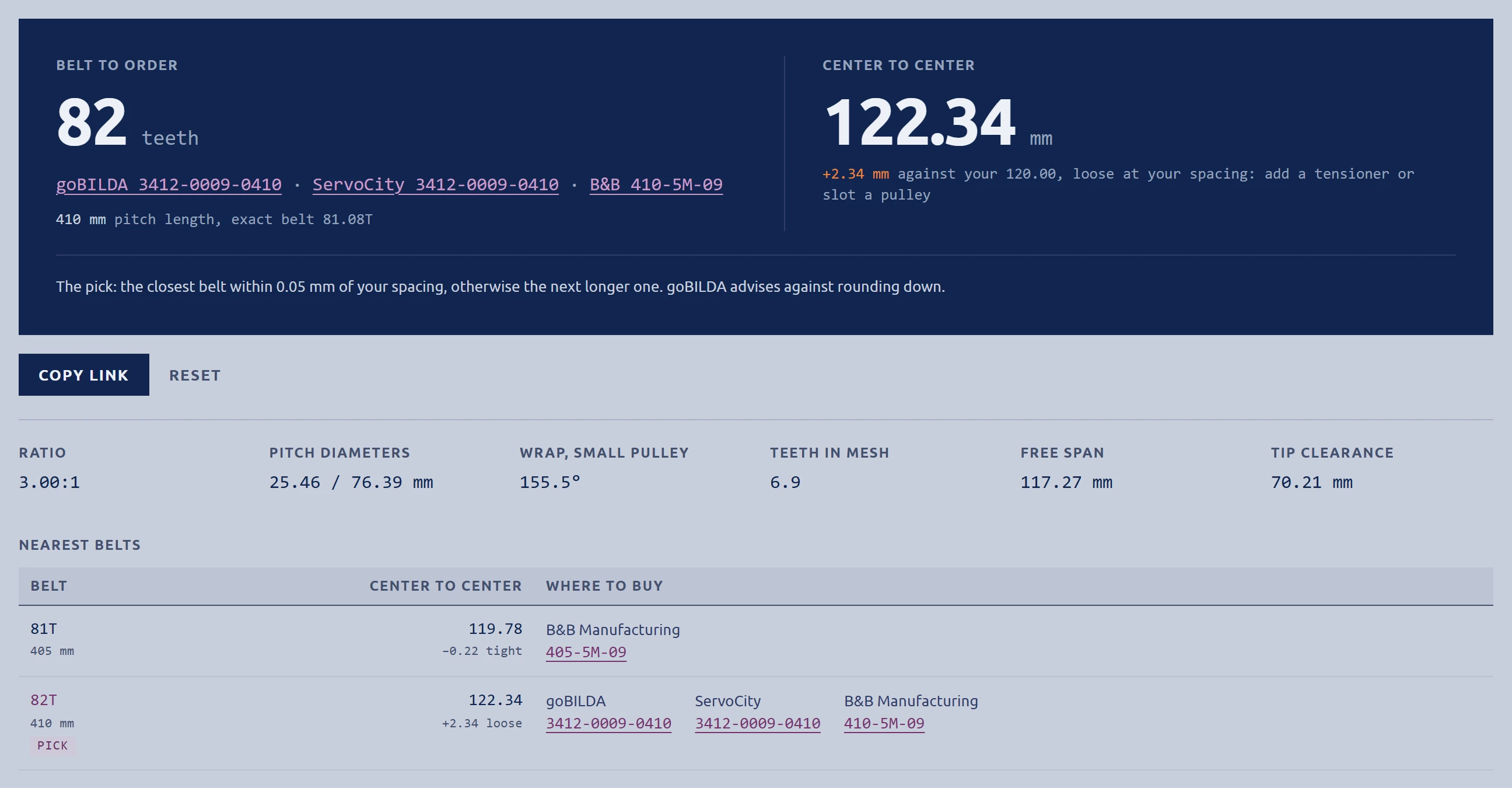
Type two pulleys and either the spacing or the belt. It solves the rest and lists the GT2 and HTD 5 mm belts you can order, with part numbers.
Loading the belt calculator
What it does
- Whichever of center distance, belt teeth or belt length you typed last drives the other two.
- Uses the exact open-belt length and solves spacing from it by Newton's method, not the shortcut most calculators use.
- Picks the closest stocked belt inside your fit tolerance, otherwise the next longer one, because a belt rounded down runs too tight.
- Warns under 6 teeth in mesh, where Gates starts derating a belt.
- belts listed
- 1,289
- catalogs, read October 7, 2026
- 8
- profiles, GT2 2 mm and HTD 5 mm
- 2
- You give it
- The belt profile and width, the two pulleys, and one of center distance, belt teeth or belt length.
- You get
- The belt to order and who sells it, the center distance it runs at, wrap, teeth in mesh, free span, tip clearance and the nearest belts either side.
How it is checked
- Matches both drives worked in the Gates PowerGrip GT2 design manual to the two decimals Gates prints. The shortcut misses both.
- A script holds the solver to those drives and to a belt built from tangent points, and fails if either answer moves.
- Every belt listed was read off a maker's product page or catalog. A size no catalog showed reads Not in database.
Transfer builder
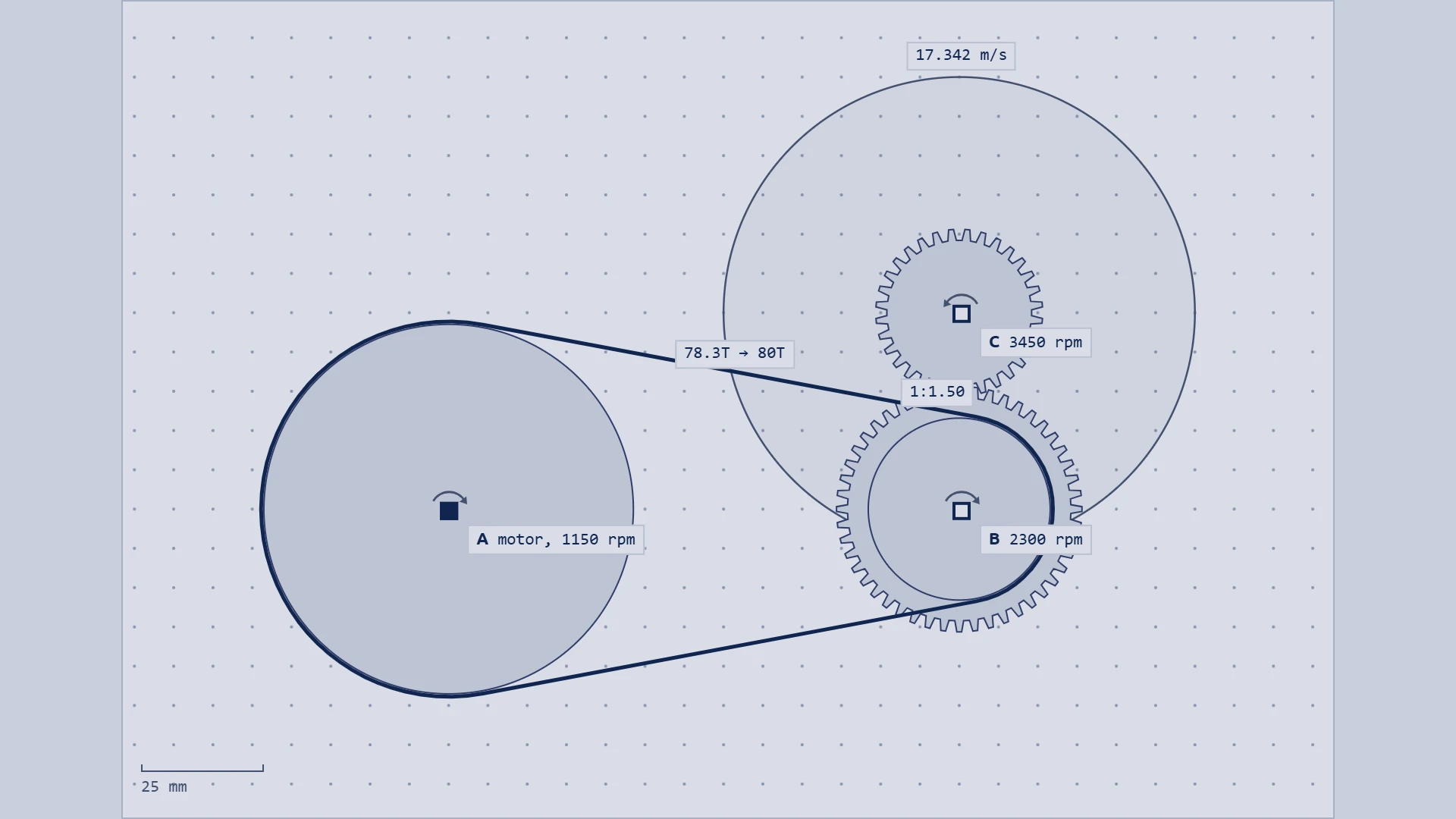
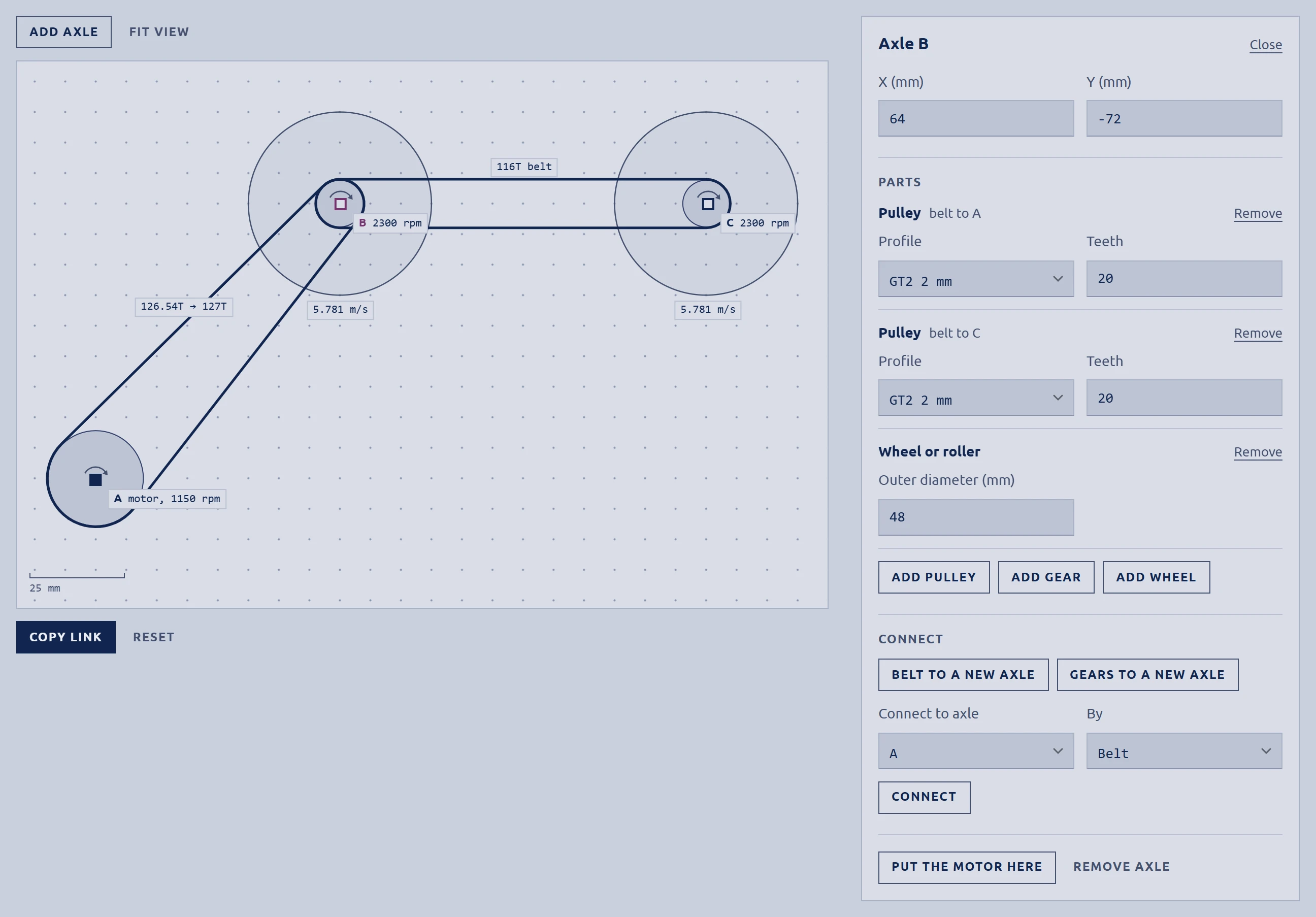
Lay out a motor, belts, gears and wheels on a side view drawn to scale. It gives every axle's speed, every wheel's surface speed and the belt each run needs.
Loading the transfer builder
What it does
- Drag axles on goBILDA's 8 mm hole grid, or nudge one a grid step with the arrow keys.
- Put any number of pulleys, gears and wheels on an axle.
- Spreads speed out from the motor: a belt keeps the direction of turn, a mesh reverses it.
- Marks a loop in orange when two paths give one axle different speeds.
- With a module on both gears and the lock on, a dragged gear swings around its mate at the meshing distance.
- You give it
- A goBILDA, REV or AndyMark motor or a custom speed, the axles, the parts on each, and the share of free speed the motor runs at.
- You get
- Speed, ratio, direction and torque for every axle, surface speed for every wheel, and for every belt the one to order and the spacing it runs at.
How it is checked
- The belt math and the pick rule are the belt calculator's own code, imported rather than copied, so the two pages cannot pick different belts.
- The same check script holds that rule to the 16T to 48T drive at 120 mm.
- Motor speeds are the drivetrain optimizer's, each traced to a vendor page in its research notes.
Surface speed
How fast a wheel's tread moves at a given wheel speed, if it does not slip. For a motor driving wheels through belts and gears, use the transfer builder.
In one second the tread covers 2.8 field tiles.
Defaults: goBILDA's 104 mm mecanum wheel on a 312 rpm motor.
Which tool do I need?
Pick the job in front of you. Each one links to the tool that does it.
I want to
- Choose gearing for a drivetrainDrivetrain optimizer
- Find out what my robot can pushDrivetrain optimizer
- Time my auto on different gearingAuto paths
- Check that an auto parks inside 30 secondsAuto paths
- Size a belt between two pulleysBelt calculator
- Find a belt I can order, with its part numberBelt calculator
- Lay out a multi-stage transferTransfer builder
- Get a flywheel's surface speedTransfer builder
How we check the math
Each tool is held to numbers someone else published. The belt checks run as a script against the calculator's own code, and the script fails if a change moves an answer.
30.0199in
Gates' worked drive
72 to 144 grooves on a 94.49 in belt. Gates prints 30.02. The shortcut most calculators use gives 30.0289.
Belt calculator
122.34mm
Which belt to order
16T to 48T HTD at 120 mm needs 81.08 teeth, so the pick is 82T, which runs at 122.34 mm.
Belt calculator and transfer builder
18.7kg·cm
goBILDA's own figure
The output torque goBILDA publishes for its 435 rpm motor, reproduced from the bare-motor spec.
Drivetrain optimizer
5.53in
Clear of the HIVE
The preload auto's closest pass to the HIVE frame, with the 18-inch footprint turned to its heading.
Drivetrain optimizer, auto paths
Also checked
- Belt length against a belt built from tangent points: within 10⁻⁹ mm, across ratios from 1:1 to 7.5:1.
- Center distance to belt and back again: within 10⁻⁶ mm.
- Teeth in mesh against Gates' own approximation: within 2%.
- Pedro Pathing read from its source at the v3.0.1 tag, not from search results.
- Buttons and charts driven in a headless browser at 1440 by 900 and 390 by 844.
Credits and sources
Where each tool's methods, data and code came from. Public sources are linked.
Drivetrain optimizer
- Physics core from Drivetrain Minmax by Ethan Zhang.
- Motor dyno data from the gm0 motor guide (opens in a new tab).
- Prior art: ReCalc (opens in a new tab) and the ILITE drivetrain simulator (opens in a new tab).
Auto paths
- Path files and code export follow Pedro-Pathing/Visualizer (opens in a new tab) (Apache-2.0), built by FTC team 16166 Watt's Up.
- Example coordinates from Pedro-Pathing/Quickstart (opens in a new tab).
- Pedro Pathing (opens in a new tab) itself was read as a reference. No code was taken from it.
- Field and scoring from the BIOBUZZ game manual (opens in a new tab).
Belt calculator
- Worked drives from the Gates PowerGrip GT2 Belt Drive Design Manual.
- The round-up rule is goBILDA's advice.
- Catalogs: goBILDA (opens in a new tab), ServoCity (opens in a new tab), AndyMark (opens in a new tab), West Coast Products (opens in a new tab), McMaster-Carr (opens in a new tab), B&B Manufacturing (opens in a new tab), SDP/SI (opens in a new tab) and Misumi (opens in a new tab).
- Equations typeset with KaTeX, served from this site.
Transfer builder
- Belt math and catalog from the belt calculator.
- Motor free speeds from the drivetrain optimizer's research notes.